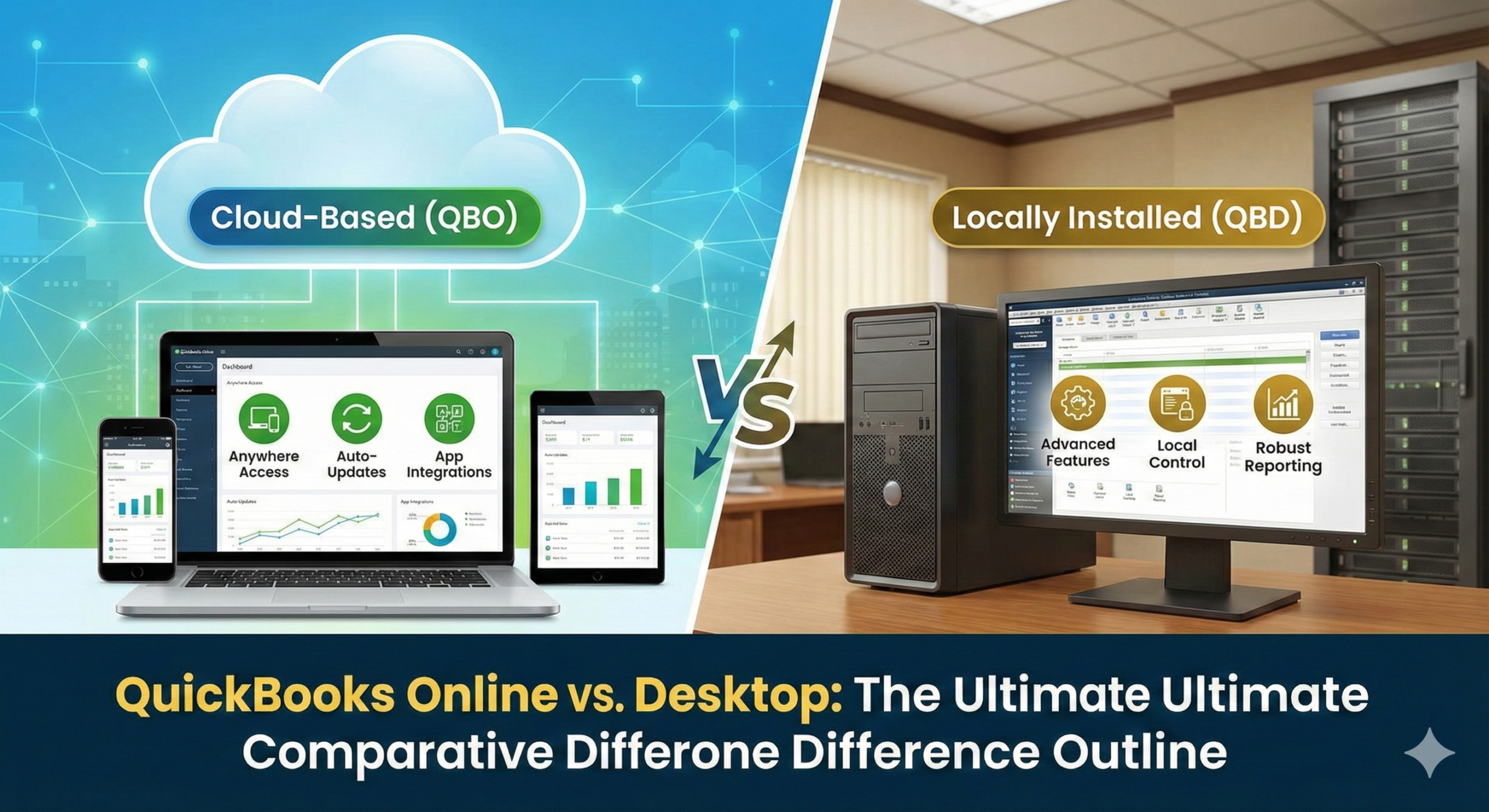
Choosing the right accounting software is one of the most critical decisions a business owner makes. Intuit’s two heavy hitters, QuickBooks Online (QBO) and QuickBooks Desktop (QBD), look similar from a distance, but they operate on fundamentally different principles.
The core difference boils down to where your data lives (Cloud vs. Local) and what your business needs (Breadth of connectivity vs. Depth of features).
Here is a detailed breakdown, explaining the comparative difference for each feature, to help you make an informed choice.
1. The Foundation: Platform and Access
This section defines how you use the software—the biggest differentiator between the two products.
A. Hosting Environment (Cloud vs. Local)
- QBO (Online): This is a cloud-based Software as a Service (SaaS) model. Your data is stored on Intuit’s secure servers. This eliminates the need for expensive local servers and internal IT management.
- QBD (Desktop): This is a traditional locally installed software model. The program is installed on a single computer or a local company server, and your company file resides there. This provides greater control but requires manual hardware maintenance.
B. Accessibility and Mobility
- QBO (Online): Wins easily on mobility. Since it’s cloud-based, you can access your books anywhere, anytime, using any device (PC, Mac, tablet, or smartphone app), as long as you have an internet connection.
- QBD (Desktop): Access is primarily limited to the specific machine where it is installed. Remote access requires extra steps, such as setting up a Virtual Private Network (VPN) or purchasing a separate, often costly, third-party cloud hosting service.
C. Multi-User Collaboration
- QBO (Online): Designed for real-time, seamless collaboration. Multiple users (and your accountant) can log in and work in the company file simultaneously without interference, making remote teamwork simple.
- QBD (Desktop): Multi-user access is available, but it is network-dependent and can be prone to slowness or errors. Everyone must be connected to the same local network, which complicates working with remote accountants or staff.
2. Cost of Ownership: Pricing and Maintenance
The way you pay for and maintain the software varies dramatically between the two versions.
A. Pricing Model
- QBO (Online): Operates on a monthly subscription model. The price is predictable and generally tiered based on the features and number of users you need.
- QBD (Desktop): Intuit has shifted this to an annual subscription model (Plus or Enterprise), which is paid yearly. While traditionally a one-time purchase, the modern QBD requires an annual fee to maintain access to support and new features.
B. Updates and Backups
- QBO (Online): Updates are automatic and happen seamlessly in the background. Data backups are handled automatically by Intuit, minimizing your risk of data loss from hardware failure.
- QBD (Desktop): You must manually install updates and annual feature upgrades. Data backup is the user’s responsibility, meaning you must regularly save copies of your company file to an external drive or cloud service.
3. The Feature Showdown: Functionality
While both handle core accounting tasks (invoicing, expense tracking), the depth of certain features is where QBD often maintains its advantage.
A. Inventory Management
- QBO (Online): Offers basic to intermediate inventory tracking (including FIFO for the Advanced plan). It is generally suitable for businesses with simple product tracking needs.
- QBD (Desktop): Provides significantly more robust and advanced inventory features (especially the Enterprise edition). This includes essential tools for complex operations like Sales Orders, Inventory Assemblies (creating new products from components), and Multi-Location Inventory tracking.
B. Reporting and Customization
- QBO (Online): Offers a good selection of reports with a focus on visual dashboards and real-time summaries. While adequate for most small businesses, its customization options are limited.
- QBD (Desktop): The established leader in reporting depth. It offers over 200 standard reports and provides a much higher degree of granular customization, allowing users to tailor financial statements and forms to highly specific business needs.
C. Third-Party App Integrations
- QBO (Online): Excels here with an open platform that supports 750+ integrations. This makes it easy to connect with modern business tools like e-commerce platforms (Shopify), advanced CRMs, and industry-specific apps.
- QBD (Desktop): Has a more limited app ecosystem (around 200 apps). Integrating these apps often requires more technical know-how or third-party connectors.
D. Job Costing and Industry Features
- QBO (Online): Includes project profitability tracking, which works well for simple job costing.
- QBD (Desktop): Offers forensic-level job costing and is available in industry-specific editions (e.g., Contractor, Manufacturing & Wholesale, Retail). This makes it the superior choice for construction, manufacturing, and other businesses with complex costing needs.
Conclusion: Which Version is Right for You?
The best choice is the one that aligns with your business model and future goals.
| Choose QuickBooks Online (QBO) if… | Choose QuickBooks Desktop (QBD) if… |
| You need to work from anywhere (high mobility). | You require advanced inventory (Assemblies, multi-location). |
| You have remote team members or an off-site accountant. | You need deep, granular job costing (Construction/Manufacturing). |
| You prioritize ease of use, automation, and a modern interface. | You require highly customized reports and forms. |
| You rely heavily on e-commerce, time tracking, or other cloud integrations. | You prefer data control on a local computer and can manage backups manually. |